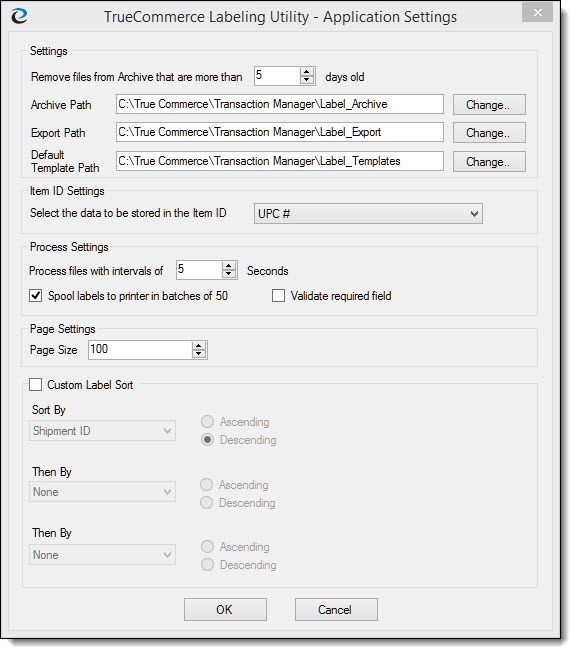
The Applications Settings menu item accesses the TrueCommerce Labeling Utility Application Settings dialog box. From this dialog box you can configure settings for archiving, define file paths, select an Item ID for labels and determine how often the ELP module processes incoming labels.
To access the Application Settings menu item from the TrueCommerce Labeling Utility window, click Tools and then click Application Settings.
The following table describes the elements available in the TrueCommerce Labeling Utility - Application Settings window.
Application Setting |
Description |
Remove Files from Archive that are more than __ days old |
Determines the number of days that files are stored in the Label_Archive directory. These files can be retrieved for reprinting purposes. |
Archive Path |
Defines the path to the folder where archived labels are stored. The labels are moved to this folder after they are processed. |
Export Path |
Defines the path where the TrueCommerce Labeling Utility looks for the UCC128.xml label file. This should match the Label Export Path defined in Transaction Manager on the Label Setup tab under Company Configuration. |
Default Template Path |
Defines
the path to the folder where the label templates (LTPs) are stored.
The label templates define the format of each label for an individual
trading partner. |
Select the data to be Stored in Item ID |
Allows you to define what item identifier is displayed in the new labels and archived labels grid. The default is UPC#. |
Process Files with Intervals of __ Seconds |
Defines
how often the TrueCommerce Labeling Utility will check for incoming
UCC-128 label files. The default value is 30 seconds. |
Spool labels to printer in batches of 50 |
When checked, labels will be spooled to the printer in batches of 50. |
Validate required field |
When checked, the required fields will be validated. |
Custom Label Sort |
When checked, the labels can be sorted, either ascending or descending by the following parameters:
|