In most cases, once a transaction has been sent from Transaction Manager, the process does not need to be repeated. However, there may be specific cases where the transaction will need to be resent.
To resend a transaction:
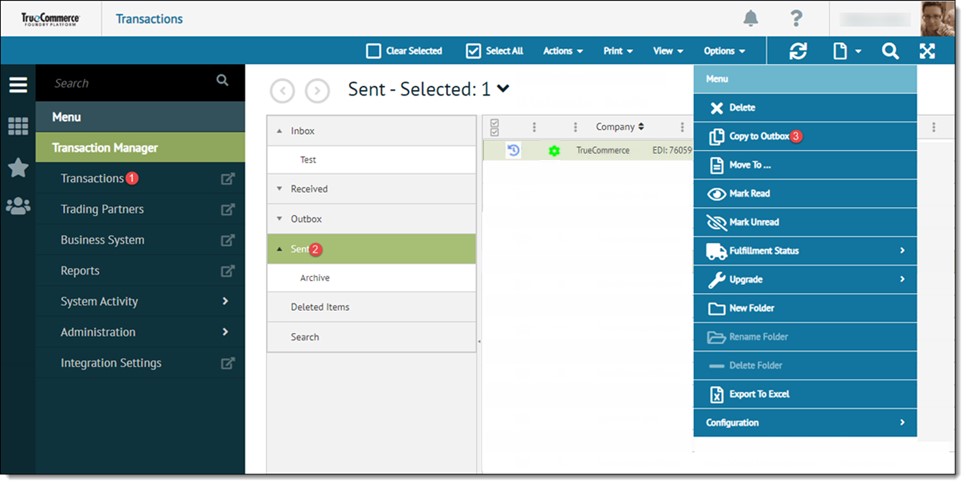
Open the Transactions view from the navigation menu.
Click the Sent folder and select the transaction to be sent again. Transaction Manager allows for one or more transactions to be selected.
Select Options | Copy to Outbox from the action bar.
Click the Outbox folder to move the transaction to and click OK.
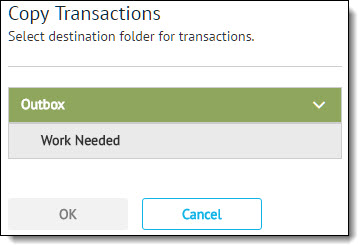
Transaction Manager copies the selected transactions in the Sent folder to the Outbox folder.
Repeat the procedure for sending transactions from Transaction Manager as described in Sending Transactions.
NOTE
If a functional acknowledgement needs to be resent, a different procedure must be followed. The functional acknowledgement will need to be recreated. For more information, see Resending an Outgoing Functional Acknowledgment.